Difference between revisions of "ThreadScope Tour/Zoom"
(→Steps: tidy up use of images) |
(remove bookmarking and focus on the GC stuff) |
||
| (5 intermediate revisions by the same user not shown) | |||
| Line 1: | Line 1: | ||
| − | == |
+ | == Objective == |
| − | + | Use zooming to reveal more detailed performance issues |
|
| − | * Save your place with the bookmark feature and zoom back out |
||
== Steps == |
== Steps == |
||
<ol style="list-style-type: decimal;"> |
<ol style="list-style-type: decimal;"> |
||
| − | <li><p>Open the sudoku3 ThreadScope profile created [[Profile2|earlier]]</p> |
+ | <li><p>Open the sudoku3 ThreadScope profile created [[ThreadScope_Tour/Profile2|earlier]]</p> |
<pre>threadscope ./sudoku3.eventlog</pre></li> |
<pre>threadscope ./sudoku3.eventlog</pre></li> |
||
<li><p>Notice the initial lack of activity at the very beginning of program execution</p> |
<li><p>Notice the initial lack of activity at the very beginning of program execution</p> |
||
| Line 13: | Line 12: | ||
<p>What's going on there?</p></li> |
<p>What's going on there?</p></li> |
||
| − | <li><p>Use the zoom in button to explore that space a bit more |
+ | <li><p>Use the zoom in button to explore that space a bit more</p> |
| + | <p>''Hint: you can also press +/- on the keyboard''</p> |
||
[[Image:ThreadScope-zoom.png|Zooming in]] |
[[Image:ThreadScope-zoom.png|Zooming in]] |
||
<p>Notice how different the profile looks close up. What do you see? At closer inspection what looks like a moderate amount of activity is actually intense bursts using both cores, with pauses in between.</p></li> |
<p>Notice how different the profile looks close up. What do you see? At closer inspection what looks like a moderate amount of activity is actually intense bursts using both cores, with pauses in between.</p></li> |
||
| + | <li><p>While you're zoomed in, observe the link between activity and garbage collection.</p> |
||
| − | <li><p>Save the point in the zoomed-in profile as a bookmark. To do so, click in the graph to move the blue cursor to a spot of your choice.</p> |
||
| − | [[Image:ThreadScope- |
+ | [[Image:ThreadScope-sudoku2-gc.png|Activity ceased during garbage collection]] |
| + | <p>Understanding your program's performance may require looking at different resolutions, zoomed out to get the overall feel, and sometimes zoomed in to notice finer patterns like these tiny bursts of work with interleaved garbage collection.</p> |
||
| ⚫ | |||
| + | </ol> |
||
| + | == Hints == |
||
| − | <p>Then switch to bookmarks tab. Press the plus button to create the bookmark and click in the labels field to name it.</p> |
||
| − | [[Image:ThreadScope-bookmark.png|The bookmark tab]] |
||
| + | * You can also press +/- on the keyboard to zoom in and out |
||
| − | [[Image:ThreadScope-bookmarks-label.png|Adding a label]] |
||
| ⚫ | |||
Latest revision as of 19:48, 9 December 2011
Objective
Use zooming to reveal more detailed performance issues
Steps
Open the sudoku3 ThreadScope profile created earlier
threadscope ./sudoku3.eventlog
Notice the initial lack of activity at the very beginning of program execution
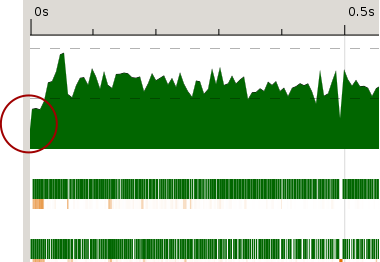
What's going on there?
Use the zoom in button to explore that space a bit more
Hint: you can also press +/- on the keyboard
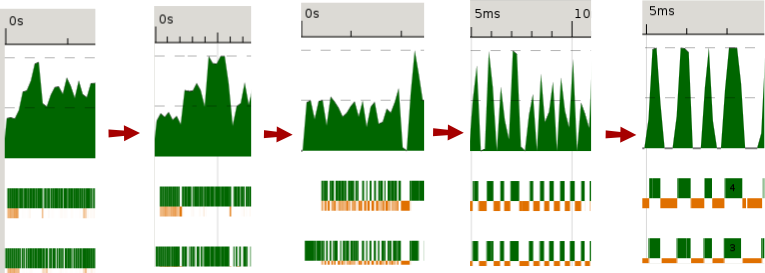
Notice how different the profile looks close up. What do you see? At closer inspection what looks like a moderate amount of activity is actually intense bursts using both cores, with pauses in between.
While you're zoomed in, observe the link between activity and garbage collection.
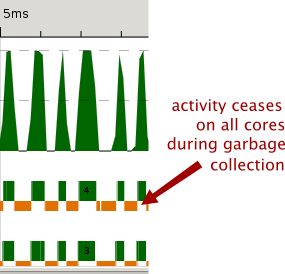
Understanding your program's performance may require looking at different resolutions, zoomed out to get the overall feel, and sometimes zoomed in to notice finer patterns like these tiny bursts of work with interleaved garbage collection.


Hints
- You can also press +/- on the keyboard to zoom in and out