Difference between revisions of "WxFruit"
Jump to navigation
Jump to search
(Added categories Games and Applications) |
(Added Category:Orphaned projects) |
||
| (One intermediate revision by the same user not shown) | |||
| Line 26: | Line 26: | ||
[[Category:Games]] |
[[Category:Games]] |
||
[[Category:Applications]] |
[[Category:Applications]] |
||
| + | [[Category:FRP]] |
||
| + | [[Category:Orphaned projects]] |
||
Revision as of 19:48, 9 May 2011
wxFruit is a graphical user interface that combines some of the power and versatility of wxHaskell with the elegance and simplicity of Fruit. The interface of wxFruit has a functional style, using arrows, whereas wxHaskell has an object oriented style.
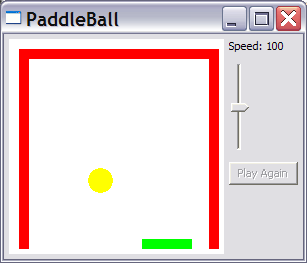
The package includes a demo game, PaddleBall:

After installing wxFruit, type paddle at a shell prompt to start the game; try to keep the ball in the game, using the mouse to move the paddle.
The position of developer/maintainer is currently open.
See also
- The wxFruit package. (Version 0.1.2 can be compiled with GHC 6.10)
- Arrow
- wxHaskell
- Yampa
- Fruit
- YaPan, a forked version of wxFruit (dated 2006-10-16, will not compile with recent GHC)
- The Juicy Fruit package, another fork of wxFruit (use the command
darcs get http://student.science.uva.nl/~rturk/juicyto download) (dated 2007-04-05, will not compile with recent GHC) - Juicy Fruit, slides in a PDF file
- WxFruit, the old homepage in the Web Archive